---
updatedAt: 2026-05-18T20:11:27.000Z
---
# Delivery Channels and Content
This guide will cover what a Delivery Channel is and how to use the Content APIs.
# Pre-requisites
1. First Orion Branded Communications agreement
2. Access to First Orion Customer Portal
3. Vetted and Approved Business
4. Understanding of [First Orion's Authentication Endpoint](https://developer.firstorion.com/firstorion-public/reference/getaccesstoken-1)
5. A Program to assign Delivery Channels to
6. Tool/Service to invoke API Endpoints (cURL examples shown here)
# Understanding
### Delivery Channels
Delivery Channels in First Orion's platform dictate what kind of Branding and or Blocking behavior a Program and the associated Phone Numbers should have. This is how we assign INFORM Text and Logo (Image) Branding and SENTRY Blocking to a Phone Number.
### Content APIs
**What is Content?** That is any Branding added to First Orion's platform, so Display Names and Images.
**Why?** This allows for the reuse of Content (Branding) between Programs so no additional vetting is needed when the same Branding is going to be used.
### How are they related?
We assign Content to a Delivery Channel, specifically the CallerName and CallerImage channels, to get Branding.
Prior to making a Program, use the [Content APIs](https://developer.firstorion.com/firstorion-public/reference/getbusinesscontentimages) to create Branding. Then Create or Update a Program's Delivery Channels like normal using the IDs from the created Content (See Examples Below).
### Is there an easier way?
Yes, use the First Orion Portal. See how to setup a Branding Program using the Portal in this
[Quick Start Guide](https://developer.firstorion.com/firstorion-public/docs/quick-start)
# Delivery Channels
We use three Delivery Channel types:
1. CallerName: This is used to assign the [INFORM Text Display](https://firstorion.com/inform/) to a Program.
2. CallerImage: This is used to assign a [INFORM with Logo (Image) Display](https://firstorion.com/inform/) to a Program.
3. Blocking: This is used to assign [Sentry](https://firstorion.com/sentry/) functionality to a Program.
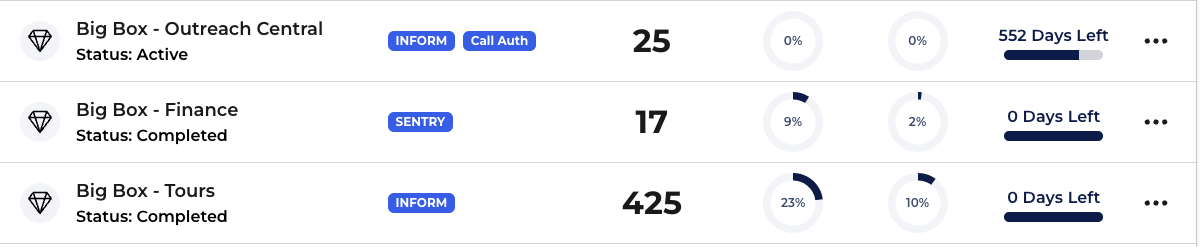
Here is a screenshot from the First Orion Portal. Notice the Program Types column. The one marked, "SENTRY", has Blocking assigned. The one marked, "INFORM", is a standard INFORM Program and only has CallerName assigned to it. The last one marked, "INFORM" and "Call Auth", has both the CallerName and CallerImage assigned along with the Call Authentication Functionality.
Here are examples of what the getting those Delivery Channels looks like using the [Get Delivery Channels Endpoint](https://developer.firstorion.com/firstorion-public/reference/getdeliverychannels-1).
```json Inform Text Only
{
"body": {
"callerName": {
"asset": {
"longName": "Big Box - Outreach",
"shortName": "BigBox Outreach",
"channelApprovals": [
"tmobile"
],
"displayNameContentId": "3367cd9c-c552-4161-a8d2-5ba18e0e4aa7"
}
},
"error": null
}
```
```json Inform Text and Logo
{
"body": {
"callerName": {
"asset": {
"longName": "Big Box - Outreach",
"shortName": "BigBox Outreach",
"channelApprovals": [
"tmobile"
],
"displayNameContentId": "3367cd9c-c552-4161-a8d2-5ba18e0e4aa7"
}
},
"callerImage": {
"asset": {
"displayNameContentId": "3367cd9c-c552-4161-a8d2-5ba18e0e4aa7",
"subjectContentId": "a703d711-0b2c-41a3-b5ca-3366f82dde52",
"imageContentId": "e88608c5-17fe-4db3-acf3-e1275da2702c",
"informPremiumEnabled": true
}
}
},
"error": null
}
```
```json Blocking only
{
"body": {
"blocking": {
"asset": {
"active": true
}
}
},
"error": null
}
```
```json Blocking with Inform Text Branding
{
"body": {
"callerName": {
"asset": {
"longName": "Big Box - Outreach",
"shortName": "BigBox Outreach",
"channelApprovals": [
"tmobile"
],
"displayNameContentId": "3367cd9c-c552-4161-a8d2-5ba18e0e4aa7"
}
},
"blocking": {
"asset": {
"active": true
}
}
},
"error": null
}
```
# Content APIs
This section will cover how to use the Content APIs.
NOTE: Content can NOT be deleted. This should not affect any functionality, just something to keep in mind.
## Step 1a - Display Name Content
Display Name Content is assigned to the CallerName Delivery Channel to get the INFORM Text Display.
Here is an example of creating Display Name Content. Notice the pending status in the response. Content will need to be approved before being assigned to a Delivery Channel. **Save the Content ID for later.**
* To check if the Display Name is approved, use this [List Content Display Names](https://developer.firstorion.com/firstorion-public/reference/getcontentdisplaynames) request. Check the third and fourth tabs for examples.
```curl Create Display Name Content
curl --request POST \
--url 'https://api.firstorion.com/exchange/v1/businesses/businessId/content/displayNames' \
--header 'Authorization: Token String' \
--header 'accept: application/json'
--data'
{
"longName": "Good Invest - Fraud Alert",
"shortName": "Fraud Alert",
"note": "Display Name for Fraud Detection teams outgoing calls"
}
'
```
```json Create Response
{
"body": {
"contentId": "a813e38c-8730-4ce4-80b1-0bead1186e4d",
"resellerId": "186e4d8c-8730-3dee-80b1-4d59d11880b1",
"businessId": "719d140e-fd6c-4d59-9241-3dee71b38320",
"type": "DISPLAY_NAME",
"status": "PENDING",
"note": "Display Name for Fraud Detection team's outgoing calls",
"longName": "Good Invest - Fraud Alert",
"shortName": "Fraud Alert"
},
"error": null
}
```
```curl Get Display Name Content
curl --request GET \
--url 'https://api.firstorion.com/exchange/v1/businesses/businessId/content/displayNames' \
--header 'Authorization: Token String' \
--header 'accept: application/json'
```
```json Get Response
{
"body": [
{
"contentId": "a813e38c-8730-4ce4-80b1-0bead1186e4d",
"resellerId": "186e4d8c-8730-3dee-80b1-4d59d11880b1",
"businessId": "719d140e-fd6c-4d59-9241-3dee71b38320",
"type": "DISPLAY_NAME",
"status": "APPROVED",
"lastUpdated": "1702249909",
"lastUpdatedBy": "VETTING_ORCHESTRATOR",
"note": "Display Name for Fraud Detection team's outgoing calls",
"longName": "Good Invest - Fraud Alert",
"shortName": "Fraud Alert"
}
],
"error": null
}
```
## Step 1b - Image Content
Image Content is assigned to the CallerImage Delivery Channel to get the INFORM with Logo Display.
Here is an example of creating Image Content. Notice the pending status in the response. Content will need to be approved before being assigned to a Delivery Channel. **Save the Content ID for later.**
* To check if the Image is approved, use this [List Business Content Images](https://developer.firstorion.com/firstorion-public/reference/postcontentimages) request. Check the third and fourth tabs for examples.
```curl Create Image Content
curl --request POST \
--url 'https://api.firstorion.com/exchange/v1/businesses/businessId/content/images' \
--header 'Authorization: Token String' \
--header 'Content-Type: application/json' \
--data '
{
"name": "Official Company Logo",
"note": "Example Note",
"content": ""
}
'
```
```json Create Response
{
"contentId": "a813e38c-8730-4ce4-80b1-0bead1186e4d",
"resellerId": "186e4d8c-8730-3dee-80b1-4d59d11880b1",
"businessId": "719d140e-fd6c-4d59-9241-3dee71b38320",
"type": "IMAGE",
"status": "PENDING",
"lastUpdated": "1710867472",
"lastUpdatedBy": "VETTING_ORCHESTRATOR",
"note": "Example Note",
"name": "Official Company Logo",
"originalImageUrl": "https://imageURL.com/a813e38c-8730-4ce4-80b1-0bead1186e4d.svg",
"renderedImages": [
{
"format": "png",
"url": "https://imageURL.com/a813e38c-8730-4ce4-80b1-0bead1186e4d.png",
"width": 256,
"height": 256,
"sha256": "sha256-0eed92ecdf9de969c1dcf9a75c4dc33dba20fd7a79d",
"jCard": {
"content": "deef8a00adafeb7e84f9dc14cc5eecd6ddcab0e239a46c9dc1cdaa6b7c62bd64c4f80470a20bdc4c3a308ce9a5557cb71b723e8d6a4478a5447cf81a31a814b1bebac48e7bc4bb6c7eff9de8a9e1bdc97e5fa4af78adbbd9ef11aeb",
"url": "https://dj7zr6u6ivguf.cloudfront.net/0ee41f9c-1845-4be8-929d-bb60cf85a0a8.png.json",
"sha256": "sha256-/ad1ce2b4bd5af0fbd125466a803f010bb018534ebe"
}
},
{
"format": "jpg",
"url": "https://imageURL.com/a813e38c-8730-4ce4-80b1-0bead1186e4d.jpg",
"width": 256,
"height": 256,
"sha256": "sha256-1aa2981cffd9c44beced90c81d5537b71e6dcacb105",
"jCard": {
"content": "deef8a00adafeb7e84f9dc14cc5eecd6ddcab0e239a46c9dc1cdaa6b7c62bd64c4f80470a20bdc4c3a308ce9a5557cb71b723e8d6a4478a5447cf81a31a814b1bebac48e7bc4bb6c7eff9de8a9e1bdc97e5fa4af78adbbd9ef11aeb",
"url": "https://dj7zr6u6ivguf.cloudfront.net/0ee41f9c-1845-4be8-929d-bb60cf85a0a8.jpg.json",
"sha256": "sha256-c76ed98dc8edb9142f9effab92a4ac5d863f84b227"
}
},
{
"format": "bmp",
"url": "https://imageURL.com/a813e38c-8730-4ce4-80b1-0bead1186e4d.bmp",
"width": 256,
"height": 256,
"sha256": "sha256-d78a4dfc72beef5bcff9bdfa6d27e1eaadeafcdbb11",
"jCard": {
"content": "deef8a00adafeb7e84f9dc14cc5eecd6ddcab0e239a46c9dc1cdaa6b7c62bd64c4f80470a20bdc4c3a308ce9a5557cb71b723e8d6a4478a5447cf81a31a814b1bebac48e7bc4bb6c7eff9de8a9e1bdc97e5fa4af78adbbd9ef11aeb",
"url": "https://dj7zr6u6ivguf.cloudfront.net/0ee41f9c-1845-4be8-929d-bb60cf85a0a8.bmp.json",
"sha256": "sha256-e0e8c28a4bc5e4f2b23ba1cbab42e5fd2cb27bfedc"
}
}
]
}
```
```curl Get Image Content
curl --request GET \
--url 'https://api.firstorion.com/exchange/v1/businesses/businessId/content/images' \
--header 'Authorization: Token String' \
--header 'Content-Type: application/json' \
```
```json Get Response
{
"contentId": "a813e38c-8730-4ce4-80b1-0bead1186e4d",
"resellerId": "186e4d8c-8730-3dee-80b1-4d59d11880b1",
"businessId": "719d140e-fd6c-4d59-9241-3dee71b38320",
"type": "IMAGE",
"status": "APPROVED",
"lastUpdated": "1710867472",
"lastUpdatedBy": "VETTING_ORCHESTRATOR",
"note": "Example Note",
"name": "Official Company Logo",
"originalImageUrl": "https://imageURL.com/a813e38c-8730-4ce4-80b1-0bead1186e4d.svg",
"renderedImages": [
{
"format": "png",
"url": "https://imageURL.com/a813e38c-8730-4ce4-80b1-0bead1186e4d.png",
"width": 256,
"height": 256,
"sha256": "sha256-0eed92ecdf9de969c1dcf9a75c4dc33dba20fd7a79d",
"jCard": {
"content": "deef8a00adafeb7e84f9dc14cc5eecd6ddcab0e239a46c9dc1cdaa6b7c62bd64c4f80470a20bdc4c3a308ce9a5557cb71b723e8d6a4478a5447cf81a31a814b1bebac48e7bc4bb6c7eff9de8a9e1bdc97e5fa4af78adbbd9ef11aeb",
"url": "https://dj7zr6u6ivguf.cloudfront.net/0ee41f9c-1845-4be8-929d-bb60cf85a0a8.png.json",
"sha256": "sha256-/ad1ce2b4bd5af0fbd125466a803f010bb018534ebe"
}
},
{
"format": "jpg",
"url": "https://imageURL.com/a813e38c-8730-4ce4-80b1-0bead1186e4d.jpg",
"width": 256,
"height": 256,
"sha256": "sha256-1aa2981cffd9c44beced90c81d5537b71e6dcacb105",
"jCard": {
"content": "deef8a00adafeb7e84f9dc14cc5eecd6ddcab0e239a46c9dc1cdaa6b7c62bd64c4f80470a20bdc4c3a308ce9a5557cb71b723e8d6a4478a5447cf81a31a814b1bebac48e7bc4bb6c7eff9de8a9e1bdc97e5fa4af78adbbd9ef11aeb",
"url": "https://dj7zr6u6ivguf.cloudfront.net/0ee41f9c-1845-4be8-929d-bb60cf85a0a8.jpg.json",
"sha256": "sha256-c76ed98dc8edb9142f9effab92a4ac5d863f84b227"
}
},
{
"format": "bmp",
"url": "https://imageURL.com/a813e38c-8730-4ce4-80b1-0bead1186e4d.bmp",
"width": 256,
"height": 256,
"sha256": "sha256-d78a4dfc72beef5bcff9bdfa6d27e1eaadeafcdbb11",
"jCard": {
"content": "deef8a00adafeb7e84f9dc14cc5eecd6ddcab0e239a46c9dc1cdaa6b7c62bd64c4f80470a20bdc4c3a308ce9a5557cb71b723e8d6a4478a5447cf81a31a814b1bebac48e7bc4bb6c7eff9de8a9e1bdc97e5fa4af78adbbd9ef11aeb",
"url": "https://dj7zr6u6ivguf.cloudfront.net/0ee41f9c-1845-4be8-929d-bb60cf85a0a8.bmp.json",
"sha256": "sha256-e0e8c28a4bc5e4f2b23ba1cbab42e5fd2cb27bfedc"
}
}
]
}
```
## Step 1c - Subject Content (Optional)
Subject Content is assigned to the CallerImage Delivery Channel and is used for INFORM with Logo. The result is that the final display will have an extra line of text content. Note: Not every device that can receive logo can receive the subject content.
Here is an example of creating Subject Content. Notice the pending status in the response. Content will need to be approved before being assigned to a Delivery Channel. **Save the Content ID for later.**
To check if the Subject Content is approved, use this [List Content Display Names](https://developer.firstorion.com/firstorion-public/reference/getcontentsubjects) request. Check the third and fourth tabs for examples.
```curl Create Display Name Content
curl --request POST \
--url 'https://api.firstorion.com/exchange/v1/businesses/719d140e-fd6c-4d59-9241-3dee71b38320/content/subjects' \
--header 'Authorization: Token String' \
--header 'Content-Type: application/json' \
'
{
"subject": "Fraud Alert",
"note": "Subject note example"
}
'
```
```json Create Response
{
"body": [
{
"contentId": "a813e38c-8730-4ce4-80b1-0bead1186e4d",
"resellerId": "186e4d8c-8730-3dee-80b1-4d59d11880b1",
"businessId": "719d140e-fd6c-4d59-9241-3dee71b38320",
"type": "SUBJECT",
"status": "PENDING",
"lastUpdated": "1702249909",
"lastUpdatedBy": "VETTING_ORCHESTRATOR",
"subject": "Fraud Alert",
"note": "Subject note example"
}
],
"error": null
}
```
```curl Get Display Name Content
curl --request GET \
--url 'https://api.firstorion.com/exchange/v1/businesses/719d140e-fd6c-4d59-9241-3dee71b38320/content/subjects' \
--header 'Authorization: Token String' \
--header 'Content-Type: application/json' \
```
```json Get Response
{
"body": [
{
"contentId": "a813e38c-8730-4ce4-80b1-0bead1186e4d",
"resellerId": "186e4d8c-8730-3dee-80b1-4d59d11880b1",
"businessId": "719d140e-fd6c-4d59-9241-3dee71b38320",
"type": "SUBJECT",
"status": "APPROVED",
"lastUpdated": "1702249909",
"lastUpdatedBy": "VETTING_ORCHESTRATOR",
"subject": "Fraud Alert",
"note": "Subject note example"
}
],
"error": null
}
```
## Step 2 - Create Delivery Channel
This step assumes a Program has been made up to the point of Creating a Delivery Channel.
NOTE: The Content MUST be approved to assign. Check previous steps. If you are using Sentry and do not want branding, you don't need Content/Content approved.
### CallerName
Caller Name can be assigned with either the Display Name Content ID (tab 1) or with the literal Display Name that is desired (tab 2). Either way, it will the same endpoint and receive the same response.
```curl Create CallerName Delivery Channel
curl --request POST \
--url 'https://api.firstorion.com/exchange/v1/businesses/719d140e-fd6c-4d59-9241-3dee71b38320/business-units/ec0ce06a-3739-45f5-a804-5468e60a843/programs/df567c99-9354-47e5-b30f-88ee7cbfeab4/delivery-channels/callerName' \
--header 'Authorization: Token String' \
--header 'content-type: application/json' \
--data '
{
"asset": {
"displayNameContentId": "8adb9766-2ad0-453a-8a99-ed2b281e5b06"
}
}
'
```
```curl Alternate Create
curl --request POST \
--url 'https://api.firstorion.com/exchange/v1/businesses/businessId/business-units/businessUnitId/programs/programId/delivery-channels/callerName' \
--header 'Authorization: Token String' \
--header 'Content-Type: application/json' \
--data '
{
"asset": {
"longName": "Good Invest - Fraud Alert",
"shortName": "Fraud Alert",
"note": "Display Name for Fraud Detection teams outgoing calls"
}
}
'
```
```json CallerName Response
{
"body": {
"asset": {
"longName": "Good Invest - Fraud Alert",
"shortName": "Fraud Alert",
"note": "Display Name for Fraud Detection teams outgoing calls",
"channelApprovals": [
"tmobile"
],
"displayNameContentId": "1dcb433a-af01-409f-b325-0e226c263a1f"
}
},
"error": null
}
```
### Blocking (Sentry)
```curl Create Blocking Delivery Channel
curl --request POST \
--url 'https://api.firstorion.com/exchange/v1/businesses/719d140e-fd6c-4d59-9241-3dee71b38320/business-units/ec0ce06a-3739-45f5-a804-5468e60a843/programs/df567c99-9354-47e5-b30f-88ee7cbfeab4/delivery-channels/blocking' \
--header 'Authorization: Token String' \
--header 'content-type: application/json' \
--data '
{
"asset": {
"active": true
}
}
'
```
```json Blocking Response
{
"body": {
"asset": {
"active": true
}
},
"error": null
}
```
### CallerImage
Caller Image must use this format and subjectContentId is optional. This Delivery Channel does require the Display Name Content ID, unlike CallerName.
Note: informPremiumEnabled is just an internal name for using Image/Logo.
```curl Create CallerImage Delivery Channel
curl --request POST \
--url 'https://api.firstorion.com/exchange/v1/businesses/719d140e-fd6c-4d59-9241-3dee71b38320/business-units/ec0ce06a-3739-45f5-a804-5468e60a843/programs/df567c99-9354-47e5-b30f-88ee7cbfeab4/delivery-channels/callerImage' \
--header 'Authorization: Token String' \
--header 'Content-Type: application/json' \
--data '
{
"asset": {
"displayNameContentId": "8adb9766-2ad0-453a-8a99-ed2b281e5b06",
"subjectContentId": "adfeee-4102-562a-k44s-k2ks8gj50f3m",
"imageContentId": "e6ada17e-419d-408a-91ad-f060260a5db2",
"informPremiumEnabled": true
}
}
'
```
```json CallerImage Response
{
"body": {
"asset": {
"displayNameContentId": "8adb9766-2ad0-453a-8a99-ed2b281e5b06",
"subjectContentId": "adfeee-4102-562a-k44s-k2ks8gj50f3m",
"imageContentId": "e6ada17e-419d-408a-91ad-f060260a5db2",
"informPremiumEnabled": true
}
},
"error": null
}
```
## Updating Content
1. Create new Content and gather their IDs, see previous steps.
2. Update using those IDs. The responses are not shown here but they are similar to Creating a Delivery Channel.
```curl Update CallerImage Delivery Channel
curl --request PUT \
--url 'https://api.firstorion.com/exchange/v1/businesses/719d140e-fd6c-4d59-9241-3dee71b38320/business-units/ec0ce06a-3739-45f5-a804-5468e60a843/programs/df567c99-9354-47e5-b30f-88ee7cbfeab4/delivery-channels/callerImage' \
--header 'Authorization: Token String' \
--header 'Content-Type: application/json' \
--data '
{
"asset": {
"displayNameContentId": "8adb9766-2ad0-453a-8a99-ed2b281e5b06",
"subjectContentId": "adfeee-4102-562a-k44s-k2ks8gj50f3m",
"imageContentId": "e6ada17e-419d-408a-91ad-f060260a5db2",
"informPremiumEnabled": true
}
}
'
```
```curl Update CallerName Delivery Channel
curl --request PUT \
--url 'https://api.firstorion.com/exchange/v1/businesses/719d140e-fd6c-4d59-9241-3dee71b38320/business-units/ec0ce06a-3739-45f5-a804-5468e60a843/programs/df567c99-9354-47e5-b30f-88ee7cbfeab4/delivery-channels/callerName' \
--header 'Authorization: Token String' \
--header 'Content-Type: application/json' \
--data '
{
"asset": {
"displayNameContentId": "8adb9766-2ad0-453a-8a99-ed2b281e5b06"
}
}
'
```
```curl Update CallerName Alternate
curl --request PUT \
--url 'https://api.firstorion.com/exchange/v1/businesses/719d140e-fd6c-4d59-9241-3dee71b38320/business-units/ec0ce06a-3739-45f5-a804-5468e60a843/programs/df567c99-9354-47e5-b30f-88ee7cbfeab4/delivery-channels/callerName' \
--header 'Authorization: Token String' \
--header 'Content-Type: application/json' \
--data '
{
"asset": {
"longName": "Good Invest - Fraud Alert",
"shortName": "Fraud Alert",
"note": "Display Name for Fraud Detection teams outgoing calls"
}
}
'
```
# Branding
The Programs should now Brand with the assigned Delivery Channels Contents.