

Call Authentication
Call Authentication spoof-proofs your outbound calling numbers. This end-to-end secure feature is included in the delivery of our INFORM with Logo and SENTRY Call Blocking, ensuring your customized display appears only on verified calls and/or unverified calls are blocked from reaching the end user
Benefits
- Vetted Businesses Only Platform – Businesses are vetted by First Orion before branding or blocking is enabled
- End-To-End Call Authentication - Prior to the call "originating" enterprises "signal" to First Orion. Branding is then "set" in network for finite amount of time by First Orion. The terminated phone call that passes end-to-end check will be "authenticated" and branded or spoofed accordingly.
- Consistent Attestation Level - Successful, authenticated phone calls terminate with "A-Level" attestation. Enterprises unlikely to become OSP for enterprise-level Stir/Shaken. (Some calling platforms obfuscate originating carrier resulting in inconsistent attestation levels)
Treatment of the authenticated call is dependent on the purchased service of INFORM with Call Authentication, INFORM with Logo or SENTRY Call Blocking and the creation of a calling program.
Products Dependent on Call Authentication API
- INFORM with Call Authentication
- INFORM with Logo
- SENTRY Call Blocking (with or without branding)
API Details
API Endpoints are secured by OAuth2.0 Authentication
- API credential creation, rotation, and disablement can be managed by users in Customer Portal
Delivery to All Major Carriers in the United States
- One API endpoint to brand on all networks
API Flow
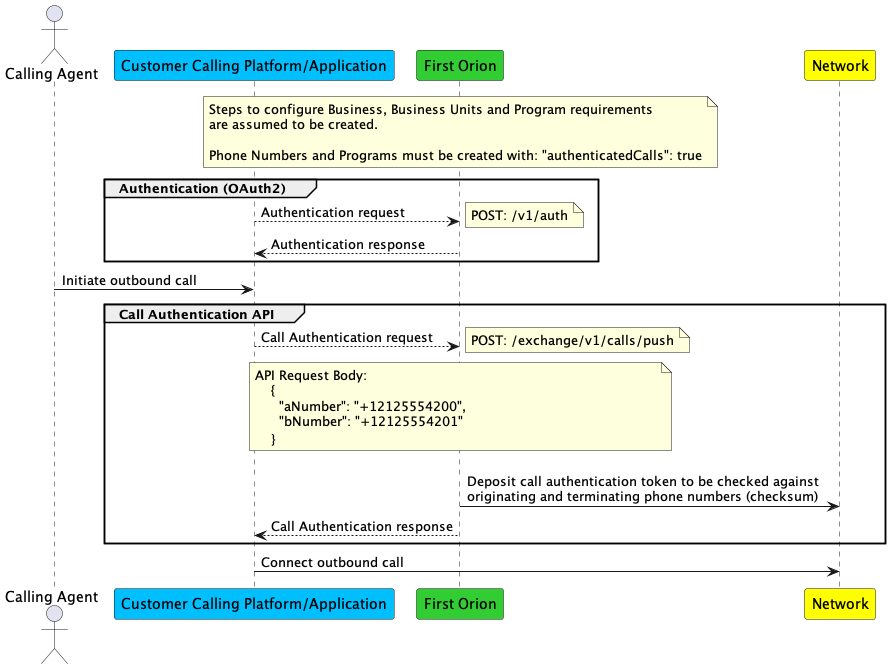
Step 1 - Generate API Keys
- Sign into First Orion's Customer Portal
- Navigate to the API Keys section on the left-hand side
- Click Generate Key
- Copy and save or download the generated keys
Step 2 - Call Authentication API
- Verify being able to generate an access token.
curl --location --request POST 'https://api.firstorion.com/v1/auth' \
--header 'X-API-KEY: [API KEY FROM PORTAL]' \
--header 'X-SECRET-KEY: [SECRET KEY FROM PORTAL]' \
--header 'X-SERVICE: auth' \
--header 'accept: application/json'- Verify being able to make an INFORM with Call Authentication API push.
curl --location 'https://api.firstorion.com/exchange/v1/calls/push' \
--header 'authorization: Bearer [FROM GET TOKEN ENDPOINT]' \
--header 'content-type: application/json' \
--data '{
    "aNumber": "+18668561234",
    "bNumber": "+15019515678"
}'- Identify where in the platforms call flow this can live and integrate it.
// Libraries
const axios = require('axios'); // Install with,  npm install axios

// Gets First Orion Auth Token
const getToken = async () => {

    try {
      const response = await axios.post(
        'https://api.firstorion.com/v1/auth',
        null,
        {
          headers: {
            'X-SERVICE':'auth',
            'X-API-KEY': 'your-api-key',
            'X-SECRET-KEY': 'your-secret-key',
            'Content-Type': 'application/json'
          }
        }
      );
      return response.data.token;

    } catch (error) {
      console.error('Error:', error);
      return {
        statusCode: error.response ? error.response.status : 500,
        body: JSON.stringify({ error: error.message })
      };
    }
}

// Create INFORM with Call Authentication push to First Orion for INFORM with Call Authentication
// Find out more at: https://developer.firstorion.com/firstorion-public/reference/callauthentication
const push_callauth = async (token) => {
    let data = JSON.stringify({
        "aNumber": '+15555555555',
        "bNumber": '+15554444444'
    });

    let config = {
        method: 'post',
        url: 'https://api.firstorion.com/exchange/v1/calls/push',
        headers: {
            'Authorization': token,
            'Content-Type': 'application/json'
        },
        data : data
    };

    axios.request(config)
    .then((response) => {
        console.log(JSON.stringify(response.data));
    })
    .catch((error) => {
        console.log(error);
    });
}

// Replace this Create Call function based on your platform
// Download the helper library from https://www.twilio.com/docs/node/install
// Set environment variables for your credentials
// Read more at http://twil.io/secure
const createCall = async () =>{
  const accountSid = "yourAccountSid";
  const authToken = "youAuthToken";
  const client = require("twilio")(accountSid, authToken);

  client.calls.create({
    url: "http://demo.twilio.com/docs/voice.xml",
    to: "+15555555555",
    from: "+15554444444",
  })
  .then(call => console.log(call.sid));
}


// Main function to invoke the push for INFORM with Call Authentication.
const main = async () => {
    const token = await getToken();
    await push_callauth(token);
    await createCall();

}

main()
import json
import requests
import os
def get_token():
url = "https://api.firstorion.com/v1/auth"
headers = {
'X-SERVICE': 'auth',
'content-type': 'application/json',
'X-API-KEY': 'your-api-key',
'X-SECRET-KEY': 'your-secret-key'
}
response = requests.request("POST", url, headers=headers)
data = response.json()
return data['token']
def push_precall(token):
url = "https://api.firstorion.com/exchange/v1/calls/push"
payload = json.dumps({
"aNumber": "+15555555555",
"bNumber": "+15554444444"
})
headers = {
'Authorization': token,
'Content-Type': 'application/json'
}
response = requests.request("POST", url, headers=headers, data=payload)
data = response.json()
value = {
'statusCode': response.status_code,
'body': data['body']['message']
}
# Return JSON Object
return json.loads(json.dumps(value))
# Replace this Create Call function based on your platform
# Download the helper library from https://www.twilio.com/docs/python/install
# Set environment variables for your credentials
# Read more at http://twil.io/secure
import os
from twilio.rest import Client
def createCall():
account_sid = "your_account_sid"
auth_token = "your_auth_token"
client = Client(account_sid, auth_token)
call = client.calls.create(
url="http://demo.twilio.com/docs/voice.xml",
to="+15555555555",
from_="+15554444444"
)
print(call.sid)
# Makes the pre-call push.
token = get_token()
precall = push_precall(token)
# Log pre-call push
print("Pre-call Status: " +str(precall["statusCode"]))
print("Pre-call Message: " +precall["body"])
createCall()// Libraries
const axios = require('axios'); // Install with, npm install axios
// Gets First Orion Auth Token
const getToken = async () => {
try {
const response = await axios.post(
'https://api.firstorion.com/v1/auth',
null,
{
headers: {
'X-SERVICE':'auth',
'X-API-KEY': 'your-api-key',
'X-SECRET-KEY': 'your-secret-key',
'Content-Type': 'application/json'
}
}
);
return response.data.token;
} catch (error) {
console.error('Error:', error);
return {
statusCode: error.response ? error.response.status : 500,
body: JSON.stringify({ error: error.message })
};
}
}
// Create Call Authentication push to First Orion for Call Authentication
// Find out more at: https://developer.firstorion.com/firstorion-public/reference/callauthentication
const push_callauth = async (token) => {
let data = JSON.stringify({
"aNumber": '+15555555555',
"bNumber": '+14155550100'
});
let config = {
method: 'post',
url: 'https://api.firstorion.com/exchange/v1/calls/push',
headers: {
'Authorization': token,
'Content-Type': 'application/json'
},
data : data
};
axios.request(config)
.then((response) => {
console.log(JSON.stringify(response.data));
})
.catch((error) => {
console.log(error);
});
}
// Set payload information and authorization credentials
// Read more at https://developer.vonage.com/en/api/voice#createCall
const createCall = async () => {
let data = JSON.stringify({
"to": [
{
"type": "phone",
"number": "14155550100"
}
],
"answer_url": [
"https://example.com/answer"
]
});
let config = {
method: 'post',
url: 'https://api.nexmo.com/v1/calls/',
headers: {
'Authorization': 'Bearer <Vonage JWT>',
'Content-Type': 'application/json'
},
data : data
};
axios.request(config)
.then((response) => {
console.log(JSON.stringify(response.data));
})
.catch((error) => {
console.log(error);
});
}
// Main function to invoke the Call Authentication push for Call Authentication.
const main = async () => {
const token = await getToken();
await push_callauth(token);
await createCall();
}
main()import json
import requests
import os
def get_token():
url = "https://api.firstorion.com/v1/auth"
headers = {
'X-SERVICE': 'auth',
'content-type': 'application/json',
'X-API-KEY': 'your-api-key',
'X-SECRET-KEY': 'your-secret-key'
}
response = requests.request("POST", url, headers=headers)
data = response.json()
return data['token']
def push_precall(token):
url = "https://api.firstorion.com/exchange/v1/calls/push"
payload = json.dumps({
"aNumber": "+15555555555",
"bNumber": "+14155550100"
})
headers = {
'Authorization': token,
'Content-Type': 'application/json'
}
response = requests.request("POST", url, headers=headers, data=payload)
data = response.json()
value = {
'statusCode': response.status_code,
'body': data['body']['message']
}
# Return JSON Object
return json.loads(json.dumps(value))
# Set payload information and authorization credentials
# Read more at https://developer.vonage.com/en/api/voice#createCall
def createCall():
url = "https://api.nexmo.com/v1/calls/"
payload = json.dumps({
"to": [
{
"type": "phone",
"number": "14155550100"
}
],
"answer_url": [
"https://example.com/answer"
]
})
headers = {
'Authorization': 'Bearer <Vonage JWT>',
'Content-Type': 'application/json'
}
response = requests.request("POST", url, headers=headers, data=payload)
data = response.json()
# Return JSON Object
return data
# Makes the pre-call push.
token = get_token()
precall = push_precall(token)
# Log pre-call push
print("Pre-call Status: " +str(precall["statusCode"]))
print("Pre-call Message: " +precall["body"])
createCall()Updated 8 months ago
Did this page help you?