

Call Authentication - SIP
Call Authentication spoof-proofs your outbound calling numbers. This end-to-end secure feature is included in the delivery of our INFORM with Logo and SENTRY Call Blocking, ensuring your customized display appears only on verified calls and/or unverified calls are blocked from reaching the end user
Benefits
- Vetted Businesses Only Platform – Businesses are vetted by First Orion before branding or blocking is enabled
- End-To-End Call Authentication - Prior to the call "originating" enterprises "signal" to First Orion. Branding is then "set" in network for finite amount of time by First Orion. The terminated phone call that passes end-to-end check will be "authenticated" and branded or spoofed accordingly.
- Consistent Attestation Level - Successful, authenticated phone calls terminate with "A-Level" attestation. Enterprises unlikely to become OSP for enterprise-level Stir/Shaken. (Some calling platforms obfuscate originating carrier resulting in inconsistent attestation levels)
Treatment of the authenticated call is dependent on the purchased service of INFORM with Call Authentication, INFORM with Logo or SENTRY Call Blocking and the creation of a calling program.
Products Dependent on Call Authentication via SIP
- INFORM with Call Authentication
- INFORM with Logo
- SENTRY Call Blocking (with or without branding)
SIP Details
SIP Trunk connection secured by SIP Level Authentication
- TLS, mTLS, SSL Certificates
Delivery to All Major Carriers in the United States
- One SIP integration to brand on all networks
SIP Flow
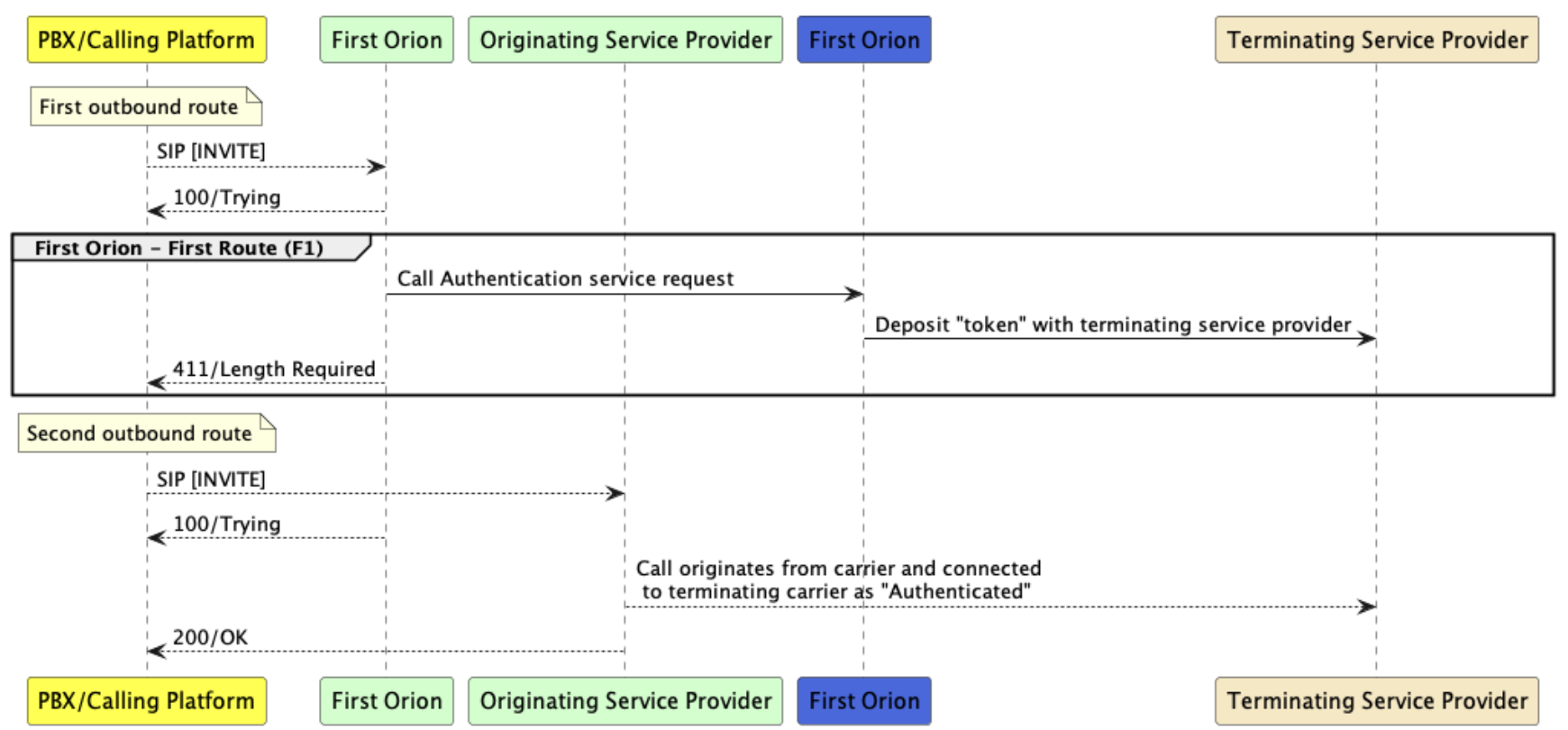
Step 1 - Share authentication details
This can very depending on platform.
- Share IP addresses between First Orion and Client
- Share needed encryption details
- Share needed certificates
Step 2 - First Orion prepares service
First Orion will take the shared details and prepare the SIP Trunk used for Call Authentication. This can take up to three days after being requested.
Step 3 - Client Creates SIP Trunk in Platform
The client should add the First Orion SIP Trunk in their platform. First Orion will provide these details to include in your SIP Trunk settings. (These can vary depending on the calling platform)
- FQDN or IP address
- SIP Signaling Port
- Failover response code(s)
- Protocol - TLS, UDP, etc.
Step 4 - Client configures routing
For Call Authentication via SIP to work, the First Orion SIP Trunk needs to be placed first in the calling platforms outbound routing.
- If OPTION pings were requested, both parties will verify the connection using the OPTIONS ping.
Step 5 - Make test calls
Client will make test calls to cover different scenarios.
- Regular outbound phone call
- Call forwarding
- Conference calling
- Transfers
Updated 7 months ago